

|
Bachelor's Degree in Telecommunications Systems and in Network Engineering |

|
Chapter I: Combinational circuits. L1.1: Introduction and projects P1 analysis Course introduction and how CSD projects are organised |
[8 Sep] |
1.1. Introduction to digital electronics
1.1.1. This is a short course presentation rec.
1.1.2. Number systems: decimal radix 10 or base 10, binary radix 2, octal radix 8, hexadecimal radix 16
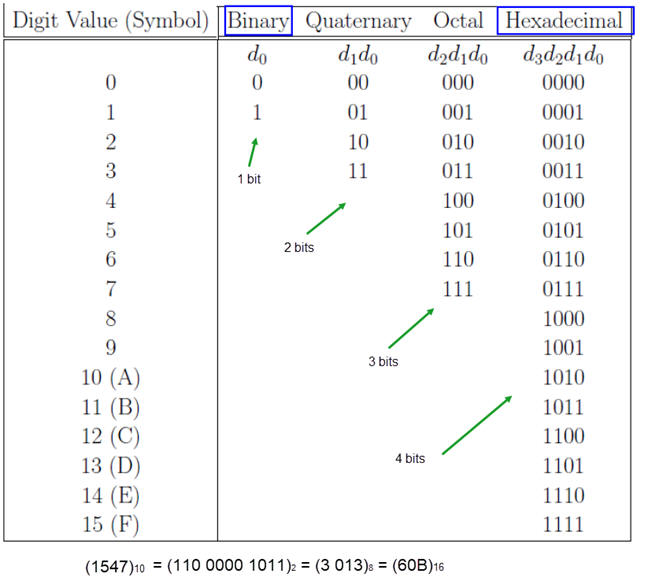
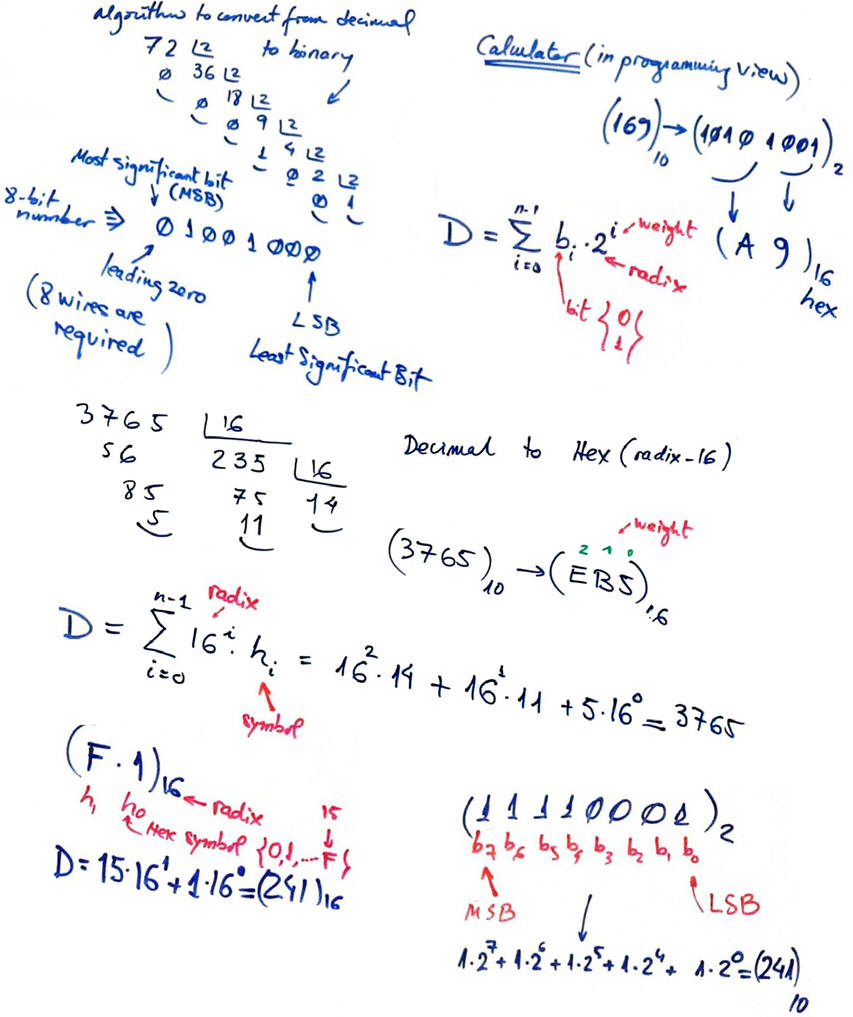
This is a reference where to find some examples,

1.2. Project organisation in CSD.
How to organise CSD projects? Write each project section in a different sheet of paper, thus, think each project report consisting in at least in four sheets of paper.
|
1. Specifications |
What do I have to do? Circuit analysis or design. In the first stage of project designing, customers and company staff meet together to discuss which are the features of the product under design. We do it in class investing all the necessary time to fully understand how does the system work. This section includes theory and study materials and lessons learned from other tutorials. |
|
2. Planning |
Normally we will prepare several plans and compare them. Graphics, schematics, circuits, models, concept maps, general ideas, process flowchart, bullet lists, etc. |
|
3. Development |
Execute one one the proposed plans. Commented computer source files, computer results, annotated graphics, pictures, timing diagrams, truth tables, circuits and other products to demonstrate that you solved the project following your plan. |
|
4. Test and verification |
Does the analysis or de design work as expected? Verifications, comparison with results from other plans, simulator and computer results, explanations and discussions to demonstrate that your project works as expected This section includes conclusions. |
In our CSD course practically all lecturing, laboratory activities and study time is devoted to solving projects as if you already were a professional engineer working in telecommunications or electronics industries:
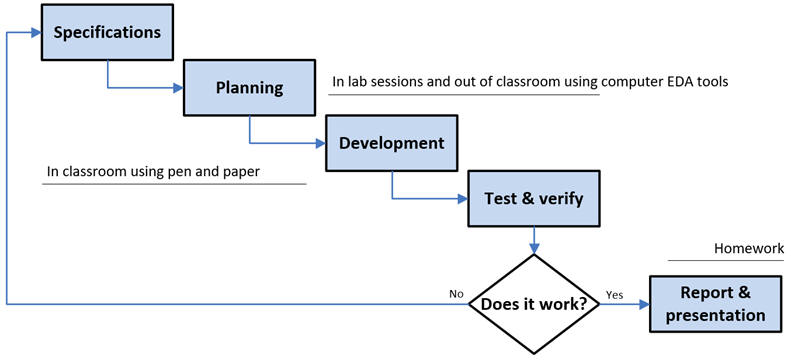 |
| Fig. 1. Project sequence. |
You are encouraged to write reports for the designed circuits, completing as many exercises as you can and showing them to us for discussion and improvement. Attending classes, writing class notes and original reports is the best way to learn deeply the course content and put into practice cross-curricular skills.
1.2.5. Cross-curricular skills (1) (2) (3) (4) (5) to be practised in CSD for implementing projects.
1.2.6. This is our rubric for organising and assessing projects.
 |
Fig. 2. Each CSD project for analysing or designing a circuit is self-contained, handwritten and structured in four sections. |
NOTE: Digsys is better used browsing the web in Firefox. However, if you need to read offline, you can print your pages of interest. This is a printed page example, where all links and colour scheme is preserved.
Checklist of basic materials AND software installation for taking the CSD subject:
-
Blank sheets of A4 paper
-
Multicolour pens
-
Scientific calculator (numbers in radix BIN, HEX, DEC)
-
Group work, cooperation. It is fundamental for email, meet, lab work, etc. Form a team of three with students of your same lab subgroup.
-
Personal computer PC running Windows 11 including the following software:
-
Enriched text editor Notepad++ v8.9.6.4 or newer
-
Labcenter Proteus 9.2 or newer
-
Altera Quartus Prime 20.1, FPGA: Cyclone IV, MAXII, MAX10
-
Siemens ModelSim 20.1, Intel edition, to be used with Quartus Prime 20.1
-
Altera DE10-Lite USB driver
-
Digilent Waveforms v3.25.1 or newer, to control the VB8012 instrument
-
Microchip MPLABX 6.30 or newer IDE
-
Microchip XC8 3.10 or newer C compiler
-
Activity #1: Generate these numbers in radices 2-8-10-16.
- (789)10
- (756)8
- (A6B)16
- (010101010101100111011)2
You can check your results using the conversion formulas or using the PC calculator in programmer's mode.

Activity #2: Hand in a handwritten sheet of paper with this information and answers:
- Your name. Laboratory subgroup. Find your two your team mates in the same laboratory subgroup.
- Have you any complication or circumstances for not being able to attend all CSD lectures and labs?
- Have you been able to download the first introductory chapter of an e-book from our library?
- Have you been able to access our Google Drive shared folder "CSD resources" to download materials such as "3. Intel_Training_VHDL.zip"?
- Have you been able to install and update in your portable computer the software Proteus?
| Home Term 26/27-Q1 Contact Products Electronic devices and companies Software Books Magazines Instruments DEE Library EETAC DEEL |

|

|
| Web activa des de 09/2001, @ F. J. Robert, Web editat amb Microsoft Expression Web 4. El contingut és un complement als materials d'estudi del curs Circuits i Sistemes Digitals disponibles al campus digital Atenea. Llicència:Reconeixement 4.0 Internacional de Creative Commons |