

|
Bachelor's Degree in Telecommunications Systems and Network Engineering |

|
Chapter 2 problems |
- D3.5 - |
LED lamp dimmer (µC - C) |
V1 |
1. Specifications
Luminaries use high-efficiency LED lamps, and the light they generate can be dimmed via a control circuit. A typical bulb is 12W, 12V, E27 screw fitting. To modulate the light intensity, we can use simple pushbuttons or rotary knots and the pulse width modulation (PWM) technique.
The same project designed using hardware is stated in D2.5.
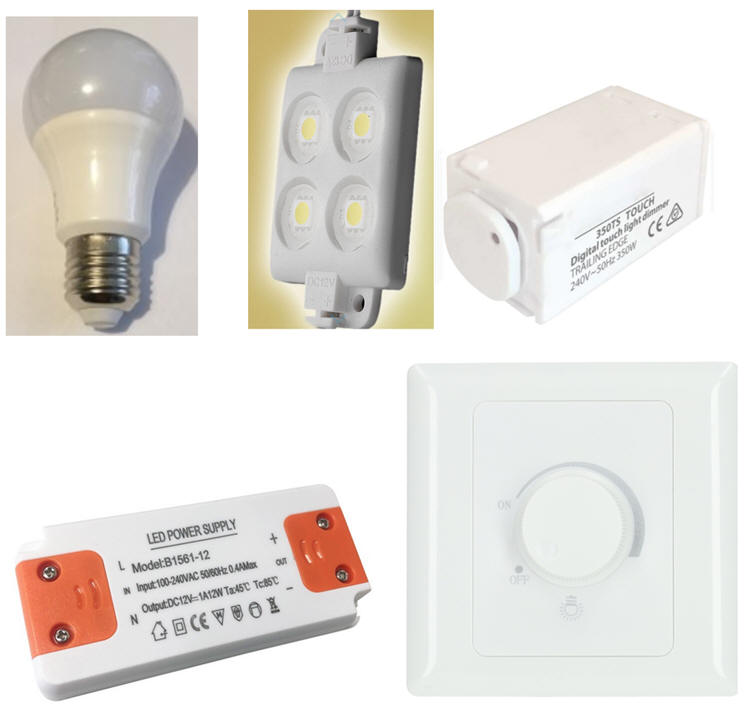 |
|
Fig. 1. Examples of luminaries, bulbs, dimmer circuits and power drivers. |
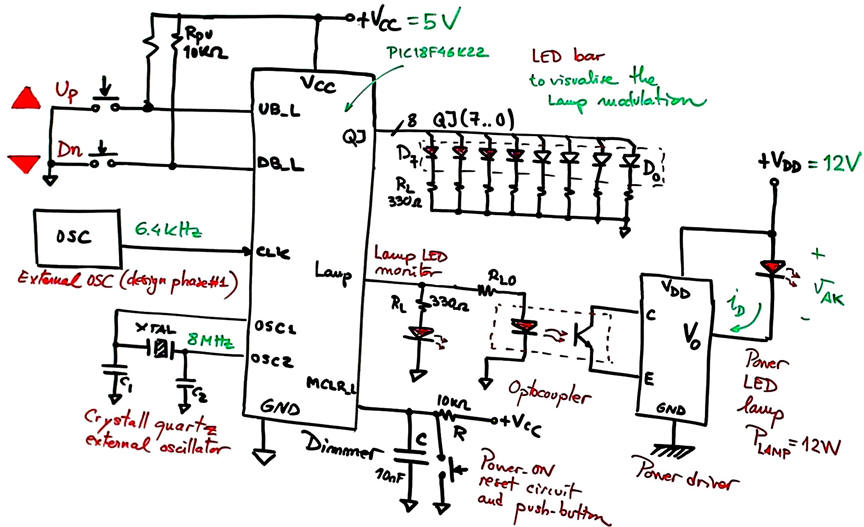
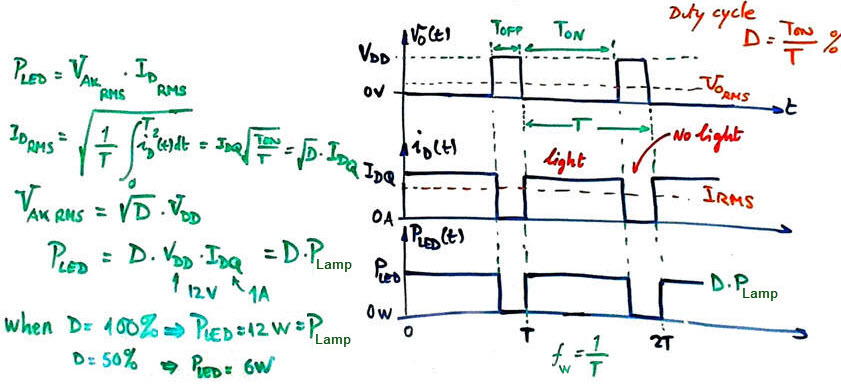
Let us propose the basic circuit for a dimmer in Fig. 2. Light intensity can be set in eight levels. Clicking the button Up, the light will increase, and clicking the button Dn the light will decrease. The idea behind controlling electrical power applied to a load like an LED bulb is to use digital pulsed-width modulated waveforms (PWM). If the switching frequency is high, the eye will not be affected by flickering.
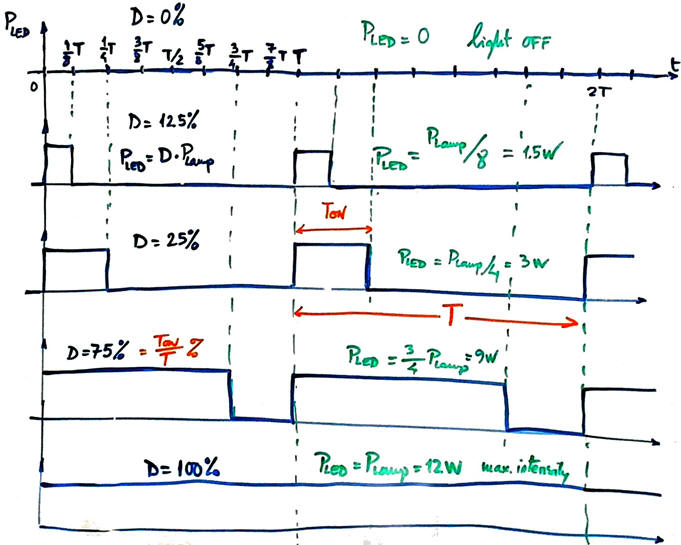
Let us invent a circuit capable of generating a 800 Hz PWM signal (T = 1.25 ms) with duty cycle modulations (D%) of 0, 12.5, 25, 37.5, 50, 62.5, 75, 87.5, 100.
   |
|
Fig. 2. Symbol and connection to a power lamp driver. Example of several PWM waveforms. |
The lamp power driver can be modelled in Proteus using power MOS transistors. At this initial phase a simple standard LED can be used to monitor the light intensity or brightness generated at the Lamp output.
2. Planning
Let us build the product organising several design phases and several steps within each phase.
Design phase #1: basic features.
Solve the circuit for the design step #1. Only when it is fully tested working correctly and reported, solve the design step #2.
- Design step #1: Consider an initial circuit with only up and down buttons and the LED bar JQ output.
Firstly, as shown in Fig. 3. you can imagine how to generate a Johnson counter for the nine light states controlled by buttons.
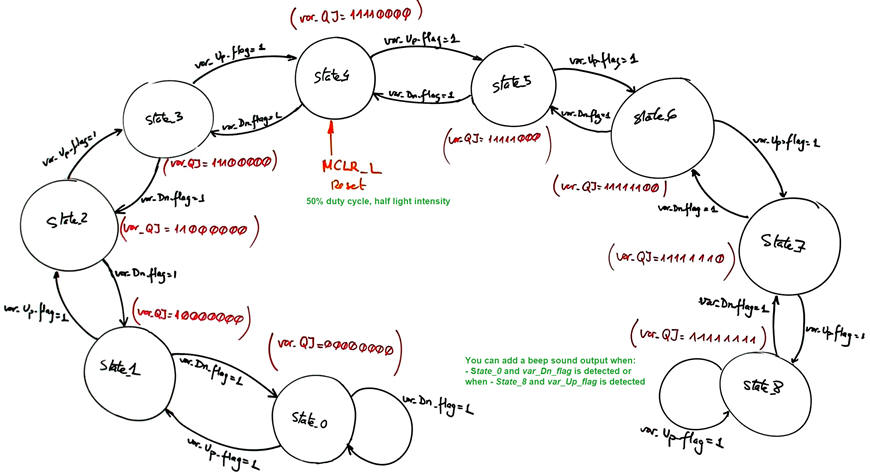 |
Fig. 3. Proposed state diagram. |
We need to use external interrupts to detect button falling edges (UB_L --> INT0; DB_L --> INT1). The debugger watch window will monitor the current value of RAM variable var_QJ in memory. You can write this variable to an external 8-LED bar to visualise the code for each state.
Project location:
C:\CSD\P10\Dimmer1\(files)
Project source files: "Dimmer.pdsprj", "Dimmer.c", "config.h"
a) Draw the hardware schematic necessary for step #1 simplifying Fig. 1: Up and Dn push buttons, Johnson code outputs, reset circuit MCLR_L, and an 8 MHz quartz crystal oscillator. How to configure the inputs and outputs in init_system().
What pins will be read, if any? Use the PORTC to connect the LED-bar. How many external interrupts are required for this step#1?
b) Draw the state diagram indicating state transitions and outputs.
What example tutorial can be used as a model to copy and adapt?
c) Draw the hardware/software diagram indicating the required RAM variables and how the FSM is solved in software.
d) Draw the truth tables and their equivalent flowcharts for state_logic() and output_logic() functions.
e) What is the interrupt service routine ISR() used in this application? Draw its flowchart.
f) Develop and test (debugging) the project capturing the hardware circuit in Proteus and writing the C source code. You must use the watch window to monitor RAM variables from the very beginning.
- Design step #2: Add the Lamp output.
Inherit the step #1 source hardware and software files into the new project location:
C:\CSD\P10\Dimmer2\(files)
Project source files: "Dimmer.pdsprj", "Dimmer.c", "config.h"
a) Complete the hardware schematic for step #2 (Fig. 1). A new external interrupt INT2 will be used to interface the 6.4 kHz oscillator CLK that will multiplex or shift-left var_JQ.
Explain what is new in sections b), c), d), e), f)
Develop and test the new feature.
Optional feature, add a Beep output signal to connect a buzzer. It will generate an audible sound (3.2 kHz) for 1.5 s when the machine is at State_0 and the user clicks Dn, or when at State_8 and the user clicks Up.
Let us add an LCD display as studied in P11 to this application. The idea is to use several ASCII characters to represent lamp illumination information
Project location:
C:\CSD\P11\Dimmer_LCD\(files)
Project source files: "Dimmer_LCD.pdsprj", "Dimmer_LCD.c", "config.h", "lcd.c", "lcd.h"
g) Enhance the schematic from the previous design phase #1 to include an LCD attached to port D as studied in tutorials.
h) Enhance the software and the source file to drive the LCD.
In this design phase you can learn the LCD interface step by step. For instance:
- Design step #1: Print ASCII messages on the LCD. For instance "MAX", "Minimum light", etc.
- Design step #2: Print numeric information, for example the current duty cycle percentage "Light DC = 87.5%"
Develop and test the new feature.
Design phase #3: Using TMR2 peripheral subsystem.
The 6.4 kHz external CLK used to serialise to the Lamp output the variable var_JQ is replaced by the internal 8-bit TMR2 peripheral to generate interrupts (TMR2IF) every TP = 156.25 µs. Discuss the hardware features of this peripheral and its applications. The external INT2 will be no longer required.
Project location:
C:\CSD\P12\Dimmer_LCD_TMR2\(files)
Project source files: "Dimmer_LCD_TMR2.pdsprj", Dimmer_LCD_TMR2.c", "config.h", "lcd.c", "lcd.h"
i) Calculate the TMR2 parameters required to generate the same Lamp 800 Hz output frequency.
j) (Optional) Add a new switch Sel_freq to be able to select between two different Lamp periods: 1.25 ms (800 Hz) and 2.5 ms (400 Hz).
Develop and test the new feature.
Chapter 2 problems |
- D3.5 - |
LED lamp dimmer (µC - C) |
V2 |
1. Specifications (Version #2)
We can optimise the lamp dimmer design by using the PIC18F46K22's integrated PWM peripheral and programming the application in MCC Melody. This project is proposed for the DEE dimmer capstone project as Option #B2. The CSD_PICstick board is used for prototyping.
| Home Term 26/27-Q1 Contact Products Electronic devices and companies Software Books Magazines Instruments DEE Library EETAC DEEL |

|

|
| Web activa des de 09/2001, @ F. J. Robert, Web editat amb Microsoft Expression Web 4. El contingut és un complement als materials d'estudi del curs Circuits i Sistemes Digitals disponibles al campus digital Atenea. Llicència:Reconeixement 4.0 Internacional de Creative Commons |