

|
Bachelor's Degree in Telecommunications Systems and Network Engineering |

|
Chapter 3 problems |
- D3.11 - |
Wireless IR TV remote control (µC - C) |
1. Specifications
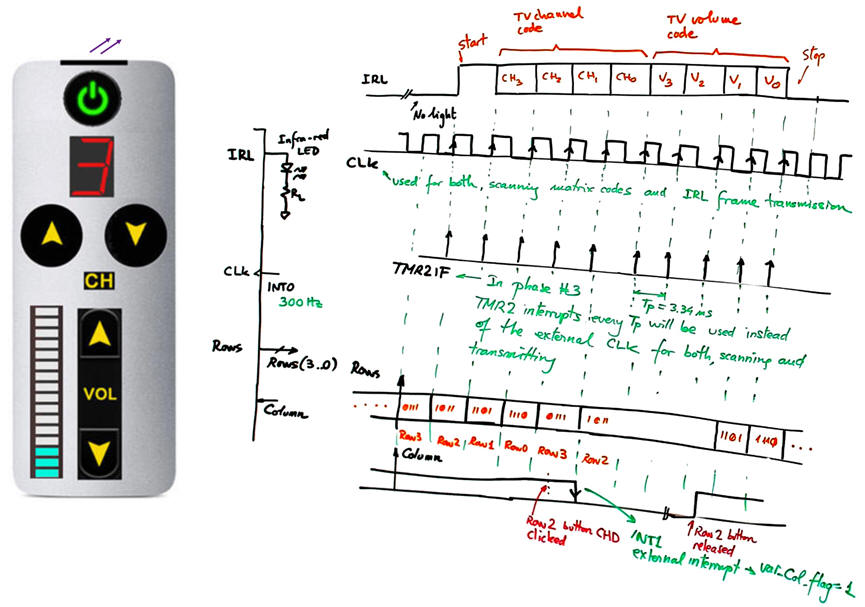
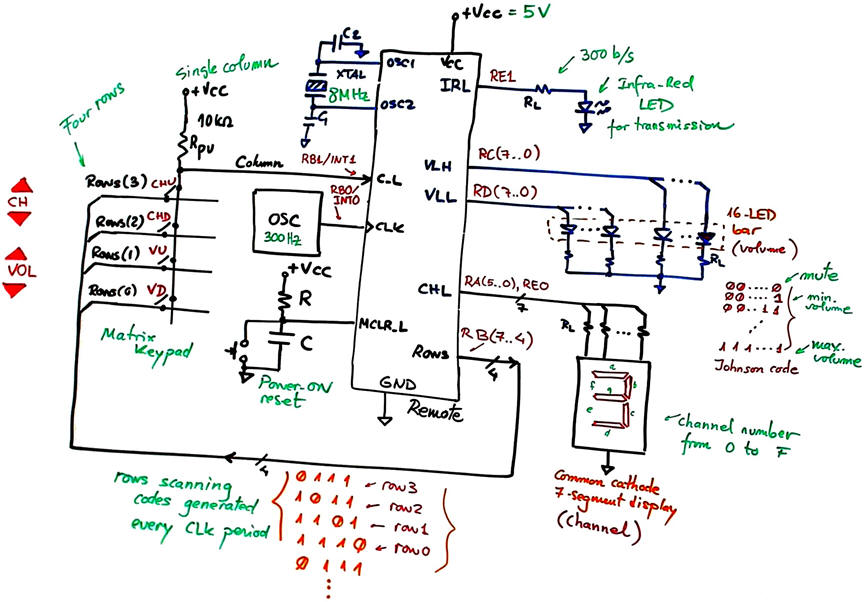
We want to design a simple TV remote as shown in Fig. 1 based on a microcontroller PIC18F46K22. To simplify it, only channel and volume selection will be implemented. A similar project using hardware is stated in D2.11.
  |
|
Fig. 1. Remote control and electronic circuit. |
The microcontroller FSM will scan the four rows of the keypad at the external oscillator rate of 300 Hz. The same frequency will be used to transmit the infra-red light to the receiver. The frame consist of a start bit at level '1' and a byte containing the two 4-bit vectors channel number and volume, as represented in Fig. 1.
2. Planning
Let us build the product organising several design phases and several steps within each phase. Firstly, as shown in Fig. 2 you can imagine how the system is continuously scanning rows when no key is pressed.
We can also figure out how the Column signal will detect one of the four keys pressed when the corresponding row has the '0' . An external interrupt RB1/INT1 is triggered on the falling edge. Basic ideas on scanning are highlighted in project P6.
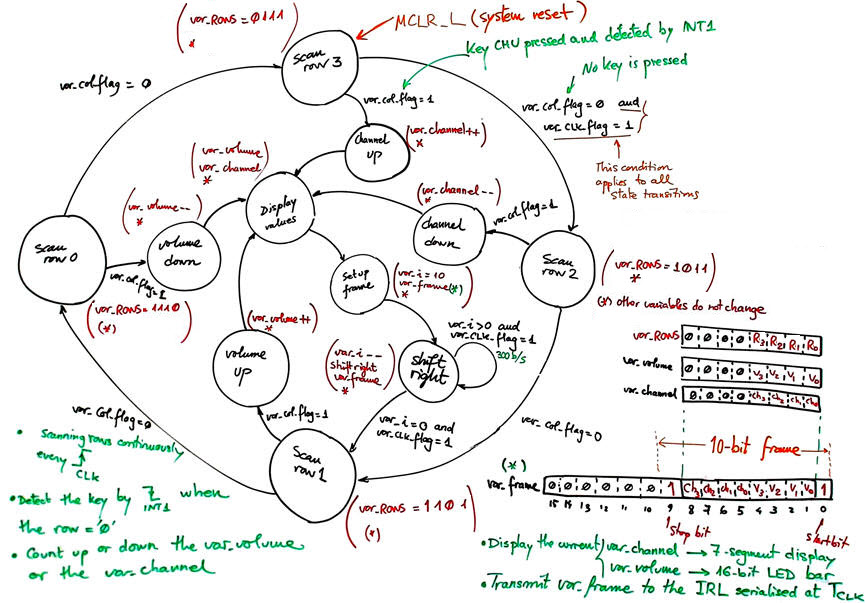 |
Fig. 2. Proposed state diagram for the FSM. |
The external CLK is used for both, scanning keys and transmitting serialised the current data on volume and TV channel by the infra-red LED. We can synchronise all state transitions and loops to the CLK rising edge, detected by another external interrupt, for instance RB0/INT0.
Design phase #1: basic features.
Solve the circuit for the design step #1. Only when it is fully tested working correctly and reported, solve the design step #2.
- Design step #1: Consider an initial circuit without volume LED bar, channels 7-segment display and infra-red LED.
Project location:
C:\CSD\P10\Remote1\(files)
Project source files: "Remote.pdsprj", "Remote.c", "config.h"
a) Draw the hardware schematic necessary for step #1 simplifying Fig. 1: external oscillator, Rows outputs and 4-key matrix keypad, Column input, reset circuit MCLR_L, and an 8 MHz quartz crystal oscillator. How to configure the inputs and outputs in init_system(). Use the suggested port connections.
What pins will be read? How many external interrupts are required for this step#1?
b) Simplify the state diagram indicating state transitions and outputs. Display_values state does not write channel and volume outputs, and Setup_frame and Shift_right does not exist. What example tutorial can be used as a model to copy and adapt?
c) Draw the hardware/software diagram indicating the required RAM variables and how the FSM is solved in software.
d) Draw the truth tables and their equivalent flowcharts for state_logic() and output_logic() functions.
e) What is the interrupt service routine ISR() used in this application? Draw its flowchart.
f) Develop and test (debugging) the project capturing the hardware circuit in Proteus and writing the C source code. You must use the watch window to monitor RAM variables from the very beginning.
- Design step #2: Add the 16-bit LED-bar for representing the volume and the 7-segment display for the channel.
Inherit the step #1 source hardware and software files into the new project location:
C:\CSD\P10\Remote2\(files)
Project source files: "Remote.pdsprj", "Remote.c", "config.h"
a) Complete the hardware schematic for step #2 (Fig. 1).
Explain what is new in sections b), c), d), e), f)
Develop and test the new feature.
- Design step #3: Add the infra-red LED output IRL.
Inherit the step #2 source hardware and software files into the new project location:
C:\CSD\P10\Remote3\(files)
Project source files: "Remote.pdsprj", "Remote.c", "config.h"
a) Complete the hardware schematic for step #3 (Fig. 1).
Explain what is new in sections b), c), d), e), f)
Develop and test the new feature.
Let us add an LCD display as studied in P11 to this application. The idea is to use ASCII characters to represent channel and volume information, replacing the 3-segment display and the 16-bit LED bar.
Project location:
C:\CSD\P11\Remote_LCD\(files)
Project source files: "Remote_LCD.pdsprj", "Remote_LCD.c", "config.h", "lcd.c", "lcd.h"
g) Enhance the schematic from the previous design phase #1 to include an LCD attached to port D (6-bit used) as studied in tutorials. Remove the 7-segment display and the 16-bit LED bar, thus, freeing 17 pins for other additional features when required.
h) Enhance the software and the source file to drive the LCD.
In this design phase you can learn the LCD interface step by step. For instance:
- Design step #1: Print ASCII messages on the LCD. For instance "Volume MAX, "TV Channel", "Keypad scanning", etc.
- Design step #2: Print numeric information, for example "Channel = 5", "Volume = 9"
Develop and test the new feature.
Design phase #3: Using TMR2 peripheral subsystem.
The 300 Hz external CLK used to scan the keypad and to serialise the channel and volume numbers is replaced by the internal 8-bit TMR2 peripheral to generate interrupts (TMR2IF) every TP = 3.34 ms. Discuss the hardware features of this peripheral and its applications. The external INT0 will be no longer required.
Project location:
C:\CSD\P12\Remote_LCD_TMR2\(files)
Project source files: "Remote_LCD_TMR2.pdsprj", Remote_LCD_TMR2 .c", "config.h", "lcd.c", "lcd.h"
i) Calculate the TMR2 parameters required to generate the same IRL 300 b/s output rate.
Develop and test the new feature.
Optional. Use the RB interrupt on change to interface a 12 key standard remote control.
Optional. Study how to sleep and wake up the remote control to save battery.
| Home Term 26/27-Q1 Contact Products Electronic devices and companies Software Books Magazines Instruments DEE Library EETAC DEEL |

|

|
| Web activa des de 09/2001, @ F. J. Robert, Web editat amb Microsoft Expression Web 4. El contingut és un complement als materials d'estudi del curs Circuits i Sistemes Digitals disponibles al campus digital Atenea. Llicència:Reconeixement 4.0 Internacional de Creative Commons |